



SPONSORED
Master Wireless Upgrades with LinkIQTM Duo Cable Network Wi-Fi Tester
Network Readiness: An All-in-One Testing Approach
Pervasive high-throughput Wi-Fi coverage is no longer a luxury; it’s an expectation for every enterprise, facility and campus, connecting everything from laptops, tablets and smartphones to printers, point-of-sale systems, IoT devices and smart TVs. With the latest Wi-Fi generations delivering multi-gigabit speeds, many organizations are upgrading their Wi-Fi access points (APs). Ensuring your LAN can effectively support new APs and enhancing Wi-Fi coverage is more complex than ever, requiring sufficient bandwidth, adequate Power over Ethernet (PoE) and proper network configuration.
That’s where the LinkIQ™ Duo Cable + Wi-Fi + Network Tester from Fluke Networks comes in — it provides a comprehensive, all-in-one testing approach to measure your network’s capacity for Wi-Fi upgrades. With LinkIQ Duo, you can confidently address every aspect of network readiness, setting the stage for successful deployment and optimization strategies.
Check Continuity and Qualify Your Cable Plant
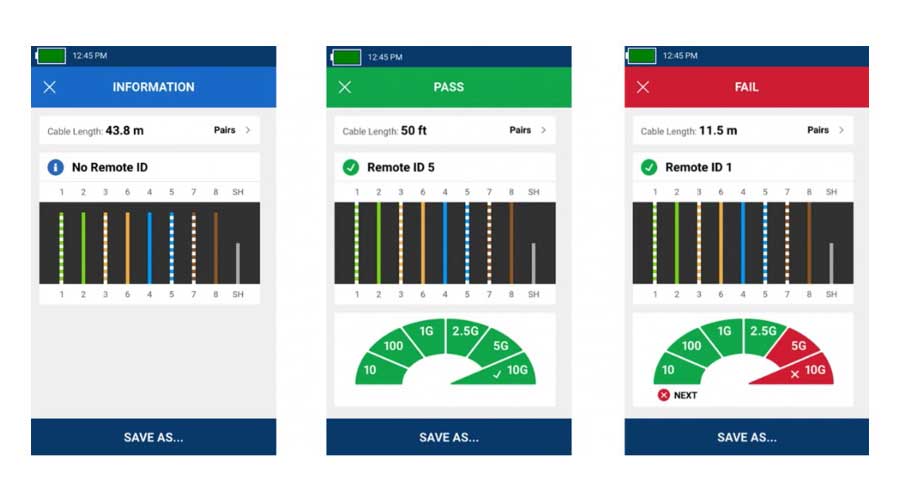
When your cable plant was installed, it was likely certified to meet industry standards. However, initial certification doesn’t guarantee existing cable links can support new Wi-Fi APs effectively. Over time, cables can suffer damage, leading to faulty terminations due to frequent handling, moves, adds and changes. If you’re looking to use an existing Category 5e or Category 6 cable plant for a Wi-Fi 5 AP (802.11ac) that requires 2.5GBASE-T or 5GBASE-T (2.5 or 5 Gbps), you’ll also need to qualify the link to ensure it can support the application.
LinkIQ Duo helps you assess cable readiness and executes qualification tests to confirm whether your cable plant can support wireless upgrades. It can verify link lengths and perform a wire map test to check for continuity, looking for opens, shorts and miswirings. If a cable fails the wire map test, the tester’s graphical display of color-coded conductors makes troubleshooting easy.
As a true qualification tester, LinkIQ Duo can also determine a link’s ability to support speeds from 10BASE-T to 10GBASE-T using frequency and IEEE standards-based measurements (with the option to set performance limits for PASS/FAIL indication). If any link can’t support the requirements of a new Wi-Fi AP, LinkIQ Duo pinpoints the exact reason for the failure, whether insertion loss, return loss, near-end crosstalk (NEXT) or delay skew.
Most Wi-Fi APs obtain their power using PoE. For an AP to work correctly, its PoE class (1-8) must be equal to or less than the power sourcing equipment (PSE), which is typically a PoE switch. To make things easier, look for Wi-Fi APs certified by the Ethernet Alliance (EA) under their PoE Certification Program. These APs will have an EA-approved mark that clearly shows their PoE class.
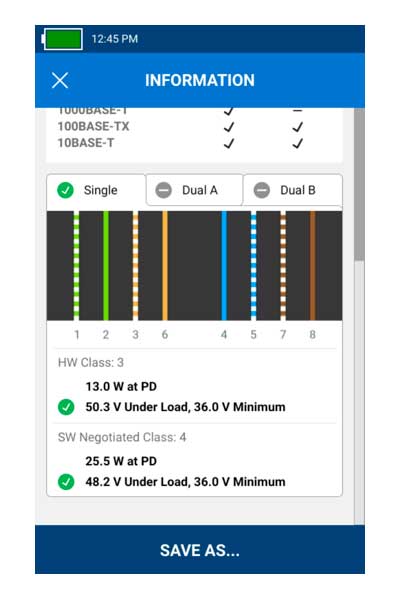
PoE-enabled switches allocate power to each port based on the requirements of its connected devices. If multiple devices are powered, your switch may not have enough available power for new Wi-Fi APs. The LinkIQ Duo tester’s PoE load testing capability is essential for verifying the advertised power from the switch is being delivered. Using Link Layer Discovery Protocol (LLDP) or Cisco Discovery Protocol (CDP), which enables a switch to advertise its capabilities, LinkIQ Duo places a load on the link and measures voltage per port in real time.
LinkIQ Duo confirms sufficient PoE on a link by indicating which pairs are carrying power and displaying the actual negotiated PoE class and wattage available from the PSE. It does this at both the hardware and software levels, ensuring your Wi-Fi APs can both receive power from the switch and efficiently negotiate for dynamic power allocation.
Verify Your Network Settings

Once you’ve confirmed the cable plant can handle the speed and PoE demands of your new Wi-Fi APs, LinkIQ Duo provides key network insights to help you ensure the right switch port and configuration. Using LLDP or CDP, LinkIQ Duo displays the switch’s name, its advertised speed, the specific port number and the virtual LAN (VLAN) assigned to a link. You can even identify the connected switch port using the tester’s Blink Port Light feature.
LinkIQ Duo also allows you to perform an IP ping test to confirm whether links can reach a specific target address, ensuring your wireless controller or gateway is operating and accessible. The IP ping test also provides valuable latency information, calculating the average response time from four pings to your target.
Optimize Your Wireless Environment

After successfully installing your Wi-Fi APs, LinkIQ Duo becomes your ultimate tool for fine-tuning your wireless environment across the 2.4, 5 and 6 GHz frequency bands, supporting all Wi-Fi generations up to Wi-Fi 6E.
The intuitive interface on the LinkIQ Duo displays all available Wi-Fi networks (SSIDs), along with their signal strength, security status, radio frequency bands and the number of APs. You can home in on a specific AP (by name or MAC address) to view all the networks it supports, its security status, country code and detailed information for each of its radios, including frequency and primary channels. The tester even alerts you to potential issues such as weak encryption or irregular channels. For each AP radio, you can dive even deeper to see channel bandwidth, channel range and channel utilization. Running a Wi-Fi connection test with LinkIQ Duo provides immediate insight into signal strength, transmit and receive rates for specific radios, helping you assess real-world performance. You can conveniently save your results on the LinkIQ Duo or export them to Fluke Networks LinkWare™ PC software for storage and easy report generation.

Where the LinkIQ Duo truly shines is in its unique graphical display, which shows channel utilization, signal strength and interference for in-range APs across all three frequency bands. For each frequency, APs are positioned on the graph based on their channel and signal strength. A signal strength of -50 dBm or higher is optimal for voice, data and video transmission. The graph also clearly displays channel utilization for each channel. Ideally, this should be below 50 percent to ensure your Wi-Fi isn’t bogged down by too much traffic. The “Channel Overlap” option shows you the range of channels for each AP, so you know if multiple APs in the same area are operating on overlapping channels. This is crucial for identifying and mitigating co-channel or adjacent channel interference, which can degrade performance by causing APs to essentially “talk over” each other.
By equipping you with extensive information about your Wi-Fi networks, channels, APs and radios, LinkIQ Duo empowers you to determine the absolute best settings for your new APs. Suppose channel utilization is too high or too many radios in the area are operating on overlapping channels. In such cases, you may need to change the channel of an AP radio or decrease its transmit power to focus coverage on a smaller area and prevent interference.
The Clear Choice for Seamless Wi-Fi Deployments
With its comprehensive capabilities as an all-in-one cable, PoE, network and Wi-Fi tester, LinkIQ Duo is the tool you need for successful Wi-Fi deployments. It eliminates guesswork and provides critical insights to qualify your cable plant, confirm PoE, configure your network and fine-tune your wireless environment. Choose the LinkIQ Duo for upgrading to robust, high-throughput Wi-Fi that meet today’s demanding connectivity needs.

Explore Fluke Networks’ portfolio of network and cable testing solutions.
ABOUT THE SPONSOR
This article was brought to you in partnership with Fluke Networks.
Fluke Networks is a global leader in electronic test tools and software, delivering trusted solutions for installation, maintenance and troubleshooting across industries. Known for precision, durability and ease of use, Fluke Networks empowers professionals to deploy, certify and maintain reliable networks. Across the world, Fluke Networks helps keep businesses running and standards high.
You might also like
-
Solving the Backhaul Bottleneck October 29, 2025 Wesco and ANDREW® are helping mobile operators overcome backhaul bottlenecks with the ValuLine® HX6-611 Antenna. Learn how this solution boosts capacity, cuts costs, and prepares networks for future growth.Sponsored
-
Wi-Fi 7 Deployment: Designing the Future of Connectivity July 29, 2025 Prepare for Wi-Fi 7 deployment with mounting solutions, thermal management and future-ready infrastructure to support high-performance wireless connectivity.Sponsored

-
Free Space Optics Delivers Last-Minute Connectivity for Concert March 21, 2025 A music venue was preparing to host a large concert, but their legacy wireless network went down just days before the event. The venue’s network infrastructure provider turned to Wesco to quickly deploy a high-bandwidth and reliable solution. Learn how we delivered a free space optics s...Article